
WebLogic is Oracle’s proprietary application server. It is Java base and Inherited when it acquired BEA Systems in 2008.
it’s used by many businesses to build and deploy enterprise applications. Weblogics popularity and widespread use has made it a target by malicious individuals.
In this post, I will provide you with suggested control that can be implemented to ensure your weblogic server is as secure as possible.
Weblogic Components
To begin we first need to understand the basic concept of Weblogic Components.
It should be noted that all the WebLogic components are Java processes.
1. Domain: This is a top-level definition of a typical application environment.
- It contains all the shared configuration and resources for the managed servers within the domain.
- It must have a single AdminServer.
- It can have zero-to-many managed servers.
- Managed Servers can be clustered across multiple machines (High Availability).
- It can have all applications under a single domain or separate domains for different functional areas. The choice is yours.
2. AdminServer: This provides web-based administration management interface for the domain.
- It provides script-based administration using WebLogic Scripting Tool (WLST).
- Managed servers can run without it AdminServer, by using local configuration.
- When a managed server starts, it attempts to get the latest config from the AdminServer.
3. Managed Server: This is the Java Virtual Machine (JVM) that actually runs deployed applications
- Applications can be deployed to one or more managed servers or to all managed servers in a cluster.
- Managed servers can be clustered to improve high availability.
4. Node Manager: This is an optional Java process to help control managed servers.
- It is necessary when dealing with clusters spread across servers.
- It can use a single node manager per server.
- WebLogic 12c encourages domain-specific node managers
The diagram below is a simple depiction of how the weblogic components are arainged in a typical enterprise configuration
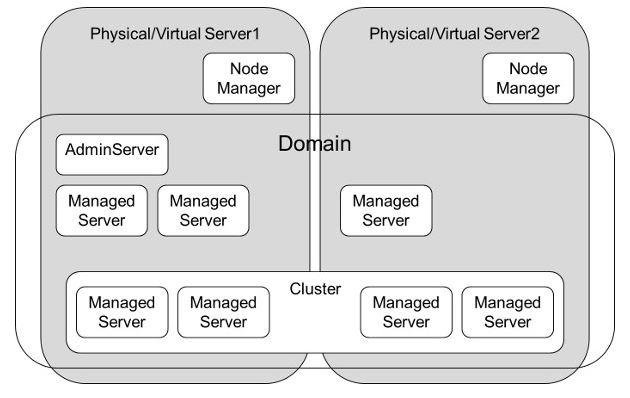
Diagram courtesy of Oracle website
Steps to Audit Weblogic Middleware
1. Understand the architecture in place.
- Request for the approved architecture of the organisations Weblogic server implementation. This should contain details that will be cross-checked by the request below.
- Obtain the list of all Weblogic servers Implemented.
- Obtain the underlining operating system the solution is hosted on.
- Obtain the list of all managed servers to be created.
- Obtain the list of all Weblogic domains planned to be deployed for each Weblogic server with their approved url. This an example of the url: http://192.168.0.1:9139/console
- Obtain the list of approved web application and services required to be running in the organisation.
2. Install and Configure WebLogic Server in a Secure Manner
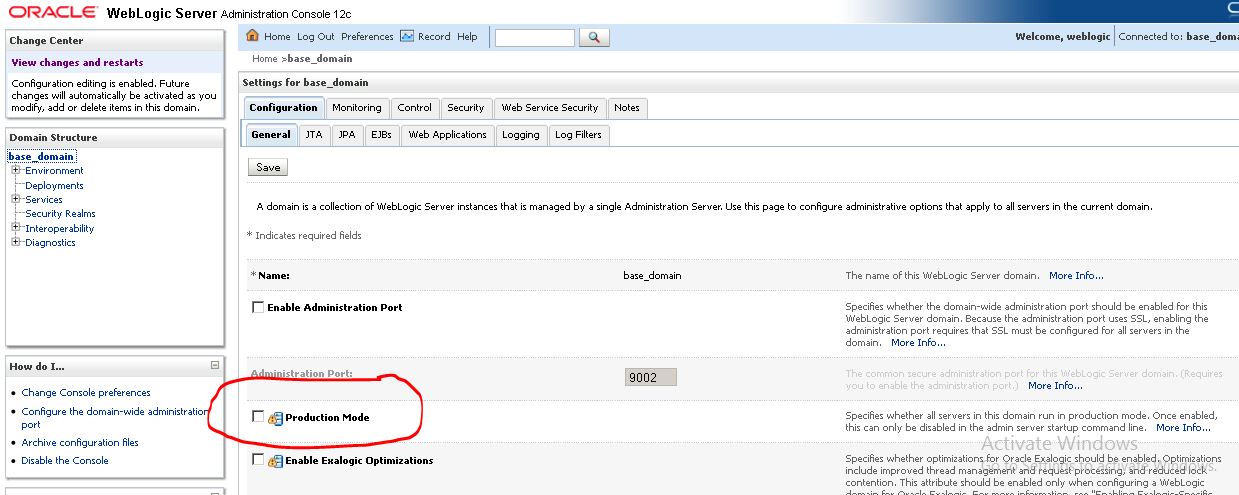
- Ensure weblogic server is not run in development mode. Rather, ensure that all weblogic domains are configured to run in either production mode or secured production mode.
- Production mode sets the server to run with settings that are appropriate for a production environment; whereas secured production mode enforces more restrictive and stringent security settings, which in turn ensures less vulnerability to threats.
Guide to check status of weblogic
- Log on to the weblogic server domain of your choice, (you will be required to be created on Weblogic per domain)
- In the home page click on “Domain” link
- Click on the “General” tab
- Confirm if the “Production Mode” is checked. If its not checked then the weblogic server is not in production mode and thus is in development mode. My screenshot below shows that my weblogic server is in development mode as the “Production mode” is not checked
3. Ensure that only the required users have access to the Weblogic domains
- Extract the list of all user in the domain and request for justification.
- Major focus should be on all users with administrative privilege.
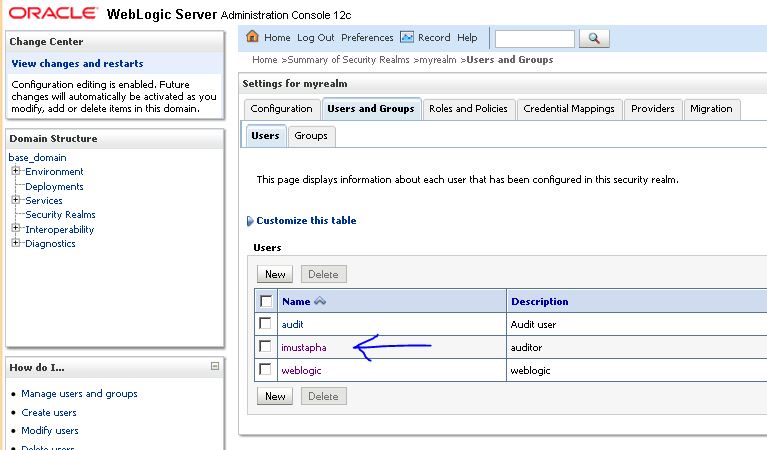
The guide below explains how to extract the list of user independently
- Log on to the weblogic server domain of your choice, (you will be required to be created on Weblogic per domain)
- At the home page scroll down to the bottom and click on the “Security realm” link.
- Select your realm. In my screenshot the name of my realm is “myrealm“

- Click on Users and Groups
- Select the user for review. In my screenshot I selected “imustapha” who happens to be an auditor
- Click on “Groups” tab
- Ensure the Administrator is not carelessly assigned to any user other that the Weblogic administrator. in my screenshot “imustapha” was only assigned to the monitor group

4. Ensure Host operating system and weblogic configuration file in each domains are well secured
- Determine the host operating system in use for the weblogic server
- Perform a vulnerability scan on the host operating system and have all issues raised in the scan resolved
- Extract the list of all the domains (this should be contained in the implementation plan documentation) and request for justification for the domain creation.
- Log on to the host operating system and ascertain who has access to the sensitive weblogic files. Permission to this file should only be granted to the weblogic and system admin. Any other user found with access should be queried.
- The list of sensitive weblogic files can be seen from this link: List of Sensitive Weblogic files to protect
5. Ensure that only the required managed servers are running on each domain.
- Extract the list of all manage servers in each Domain and compare against what was planed for in the architecture.
- Justification to be requested for any exception found.
6. Ensure that only approved web application and services are deployed on all the Weblogic server domains
- Extract the list of deployed application on all domains and compare against the list of approved web application and services required to be running in the bank.
- Ensure there are no sample applications installed. (this can be accidentally done due to poor weblogic implementation)
- An exception should be immediately raised if a deployment was detected that couldn’t be found in the approved list. Justification should be sought
The guide below explains how to view the list of deployments independently
- Log on to the weblogic server domain of your choice, (you will be required to be created on Weblogic per domain)
- At the home page scroll down to the bottom and click on the “Deployments” link
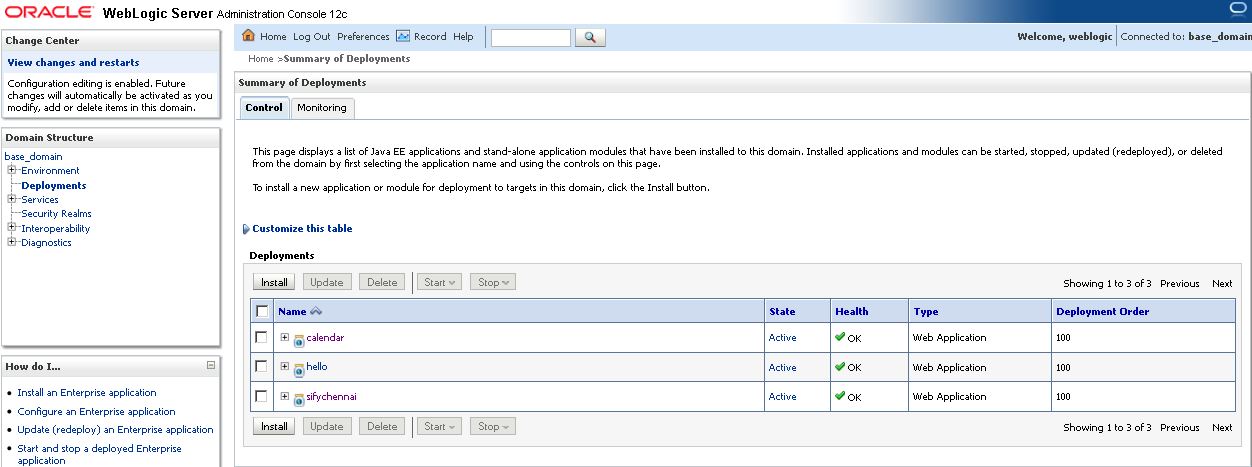
And that is it.
Please note that this is just a quick guide of what to do when auditing Weblogic server.
For more understanding of the weblogic design you can read further from this link below:
Guide to Oracle Weblogic Server
To have a better understanding of the Oracle Weblogic Security click on this link to download the PDF:
Securing a Production Environment for Oracle WebLogic Server
Thanks for reading.


Leave a Reply